Live · client system

A tattoo studio running from one calm dashboard.

Juliana is a black & grey realism artist in Jacksonville. She had no website — her Instagram was doing that job — and her paperwork lived on paper. We built the public site and the whole system behind it: a bilingual waiver clients sign on their phone, a signed PDF record for both sides, private proof-of-age capture, client records, portfolio publishing she controls herself, and a calendar that appears on her iPhone.

forAn independent tattoo studio in Jacksonville, Florida
replacedNo website, paper intake, records spread across apps and notebooks
shippedApproved demo to live production on her own domain in a single day
cox scopeStrategy, design, engineering, deployment, verification, ongoing changes
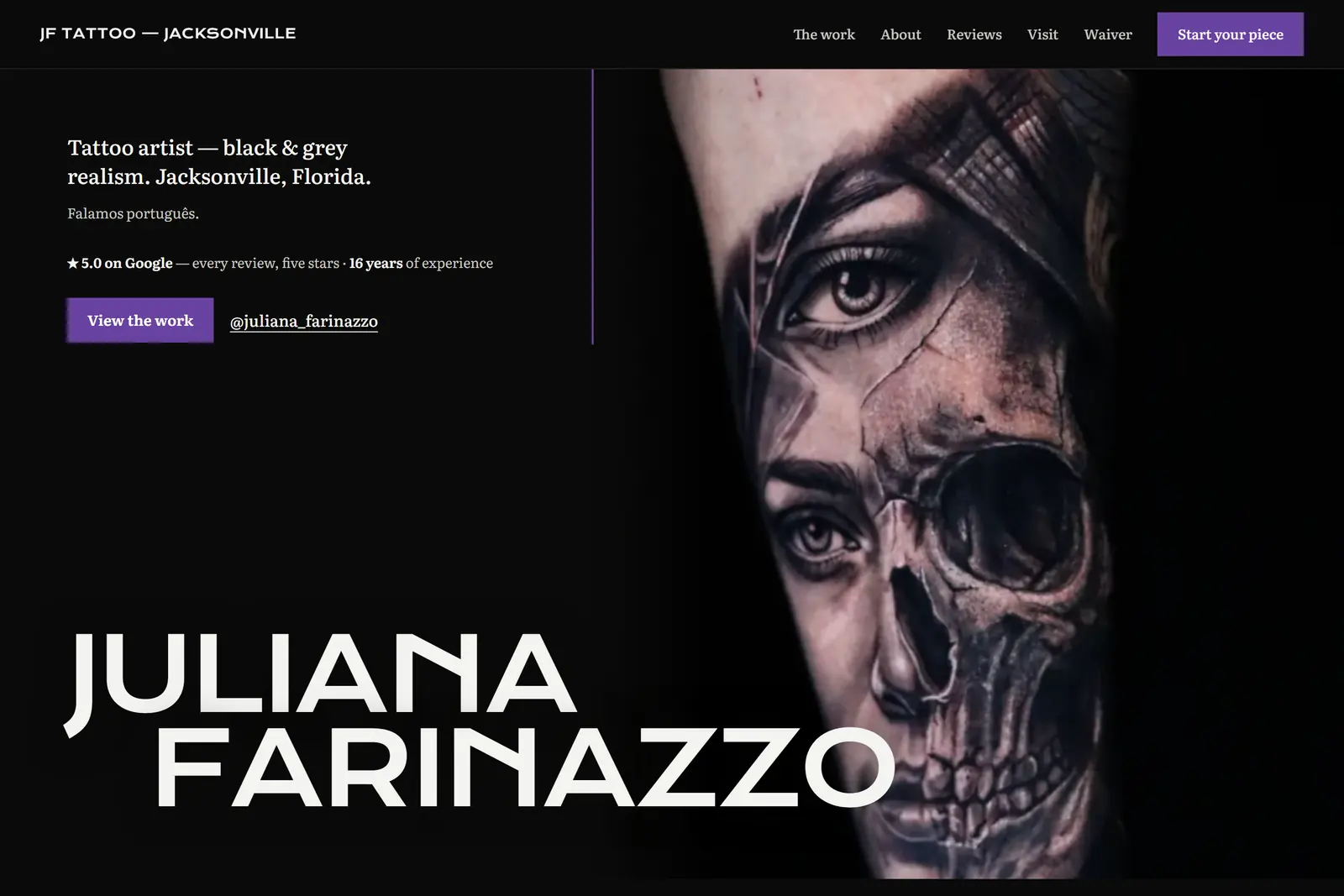
  1. The studio homepage: a full-bleed black-and-grey realism tattoo beside the artist's name set large in bone white.

    01 what her clients see

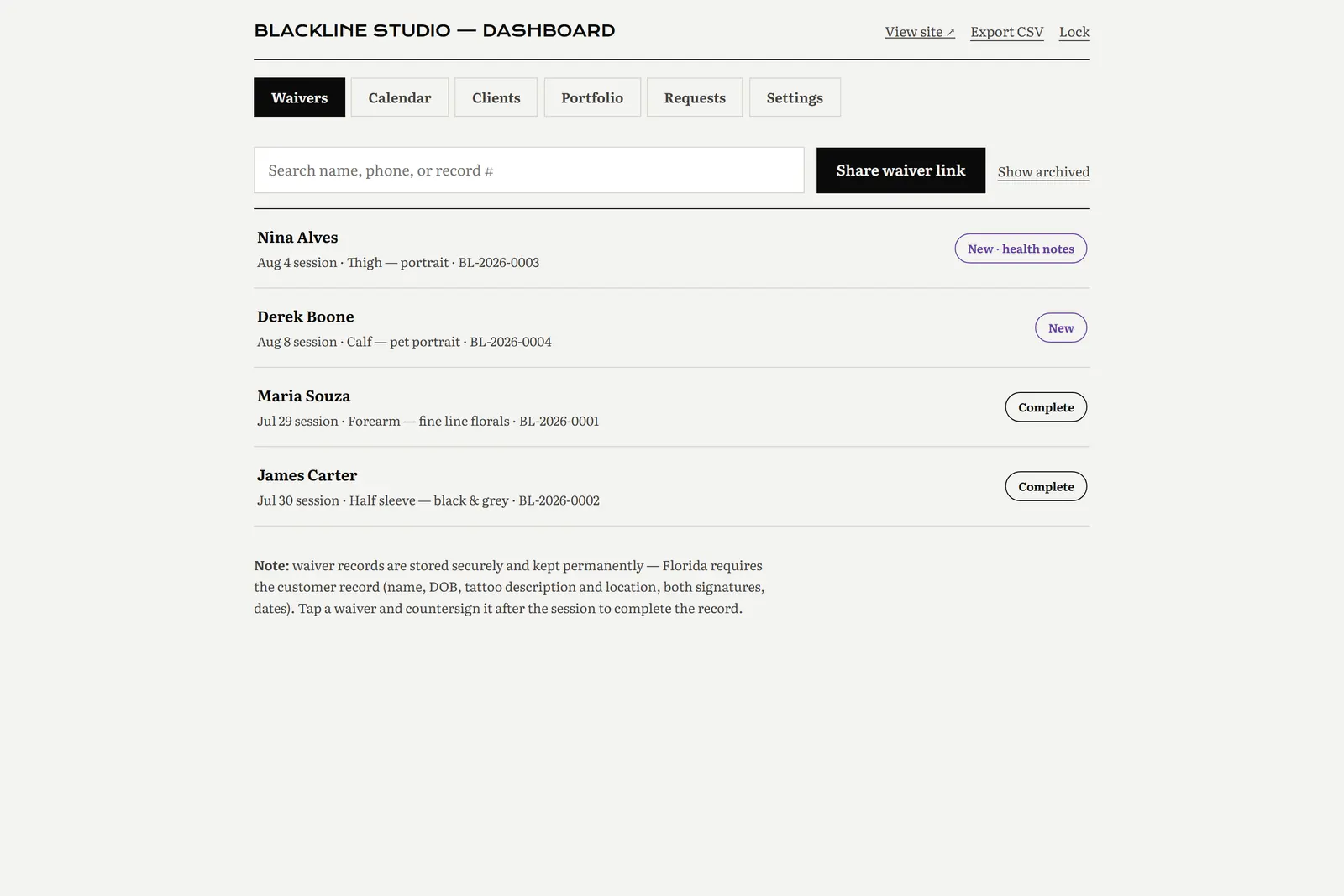
  2. The studio dashboard listing waiver records with search, share-link and export controls.

    02 what she sees

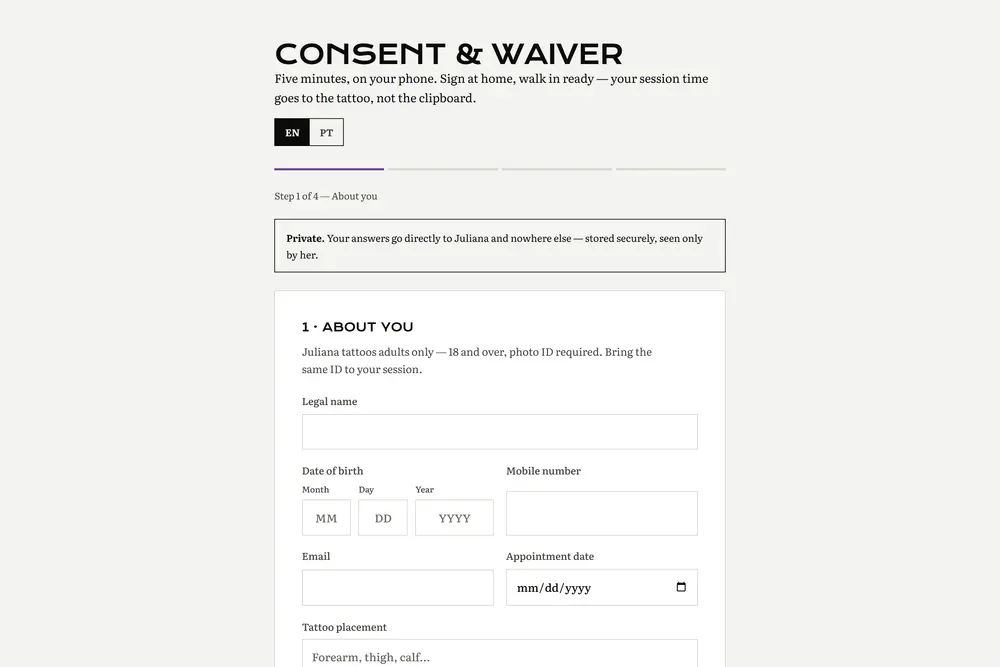
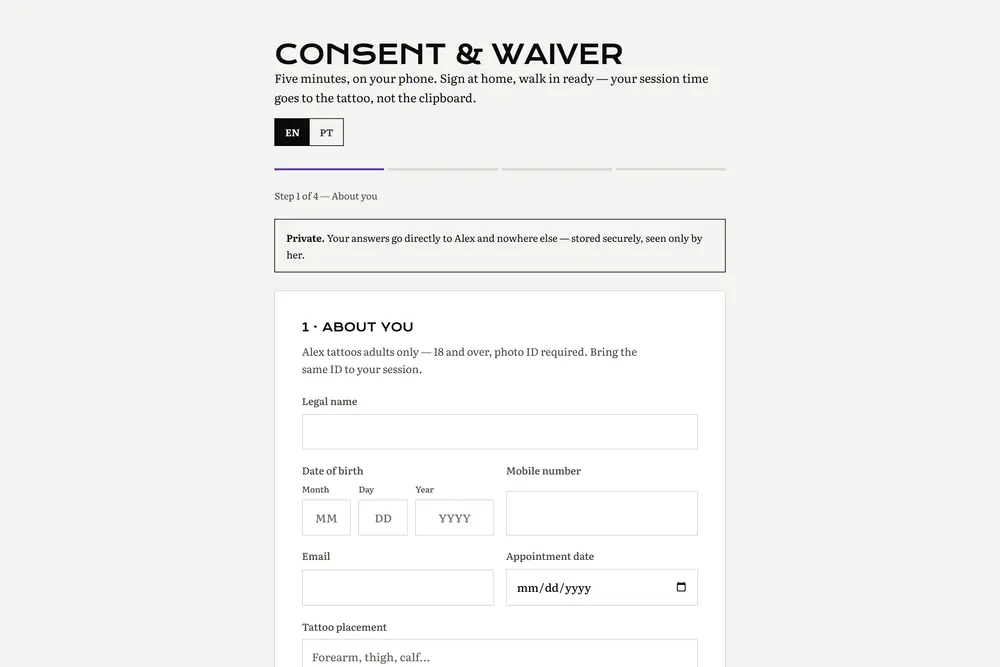
  3. The consent and waiver form as it appears on the web, with a language toggle.

    03 what gets signed

Dashboard screens throughout this page are shown on Blackline Studio — an identical build of the same platform running on sample data. We don't open a client's real records to show you a case study.

The business before the build

None of this was a design problem. It was an operations problem wearing a website's clothes.

  • Instagram was doing the job of a website, and Instagram doesn't take a consultation request.
  • Two Google listings existed for one studio. The one carrying every five-star review had no phone number, no hours, and no site.
  • Florida requires a customer record for every tattoo — the client's details, what was done, where, and both signatures. Paper does that badly.
  • Roughly half her clients are more comfortable in Portuguese than English. One waiver in one language serves half a business.
  • Updating a portfolio meant asking someone technical, so it didn't get updated.

The brief that came out of that: make the paperwork disappear into the phone, and give her one place to look.

One system, two journeys

The same records, approached from two directions.

The client

on their own phone

  1. Finds the studio and sees the actual work, not a grid of stock photos.
  2. Sends a consultation request with the times they're free — she does the scheduling, they only mark availability.
  3. Opens the waiver link and switches it to English or Portuguese.
  4. Answers the health questions, initials the consents, signs with a finger.
  5. Attaches a photo of their ID, or says they'll bring it to the session.
  6. Gets their own signed PDF copy by email. They keep it. It's theirs.

The artist

on her phone or a laptop

  1. Gets an email the moment a waiver or request comes in.
  2. Opens the dashboard and finds anyone by name, phone, or record number.
  3. Reviews health disclosures before the client is in the chair.
  4. Attaches the ID photo herself if the client didn't.
  5. Countersigns after the session, which completes the legal record.
  6. Books the next session; it appears on her iPhone calendar.
  7. Posts the finished piece, and it's on the public wall in seconds.

The system tour

One screen, one job. Every caption ends with what it means for the business.

01

A portfolio that publishes itself

The gallery on the homepage is rendered from her own database on the server, not pasted into the page. When she posts a new piece from the dashboard, the public wall has it on the next load.

She never has to ask anyone to update her website again.

The live studio homepage with the artist's name and a full-bleed tattoo photograph.

02

The waiver, in the client's language

English and Portuguese, switchable at any point without losing what's already been filled in. Eighteen-plus is validated before anything else, and the whole flow is built for a phone held in one hand.

Nobody signs a legal document they can only half read.

The live consent and waiver form with its language toggle.

03

Signed, generated, delivered

Signing produces a real PDF: the studio's header, every question and the client's answer, the initialled consents, the signature, the timestamp. It goes to her inbox and to the client's, and it can be regenerated any time from the dashboard.

Both sides hold the same document. No one has to trust a screenshot.

The waiver flow shown on the anonymized demo build, with health questions and consent initials.

04

Every record, searchable in one list

Name, phone, or record number. Health notes are flagged before the session. Countersigning is one tap. Records can be archived, and permanent deletion is deliberately awkward to reach.

A records request stops being an afternoon of digging through a box.

The dashboard waivers list with search, share-link, export and per-record status.

05

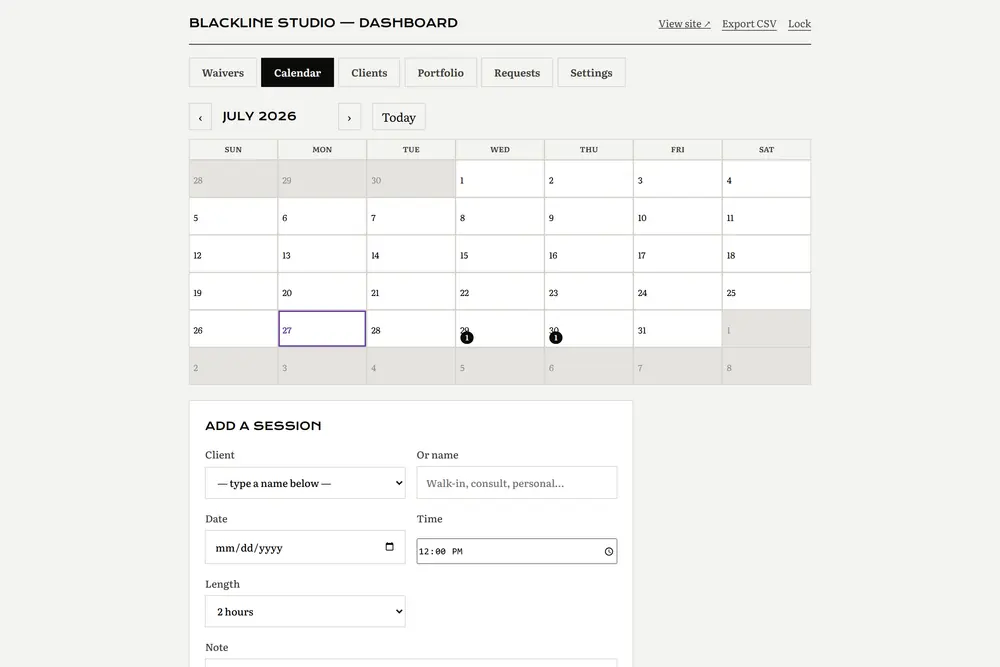
Sessions that land on her actual calendar

Sessions are booked in the dashboard, and the calendar publishes a private feed her iPhone subscribes to once. From then on her studio schedule is simply in her calendar app, next to everything else.

She checks her day the same way she already checks her day.

The dashboard calendar: a month grid with session markers and an add-a-session form.

06

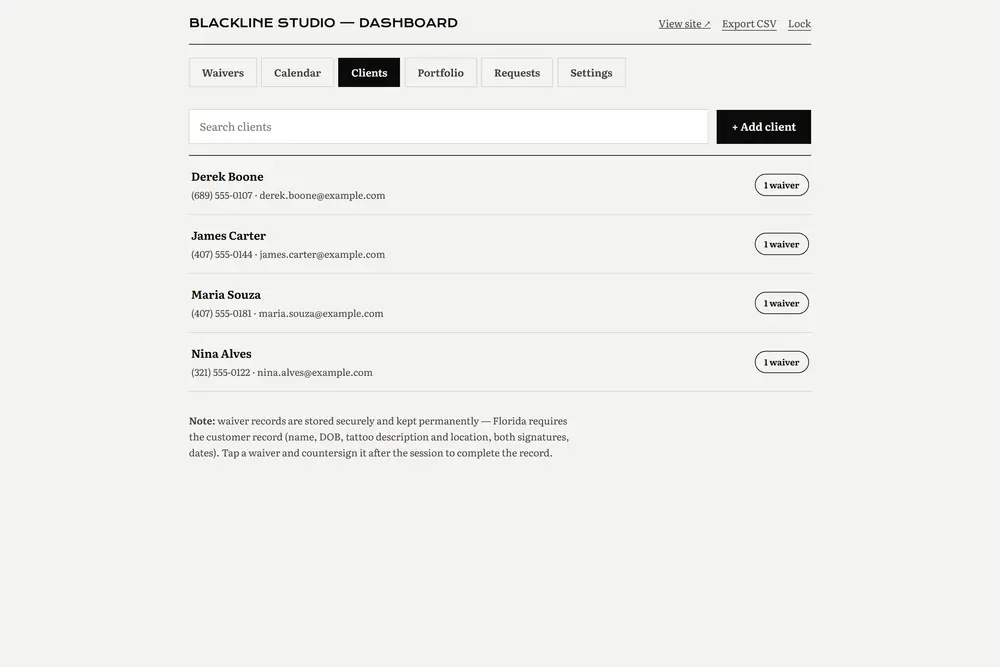
Clients, not just paperwork

Signing a waiver creates or matches a client automatically by phone and email. Each one carries notes, a work log, and every waiver they've ever signed.

The regular who came back after two years is one search away.

The dashboard clients tab listing client records with linked waivers and notes.

07

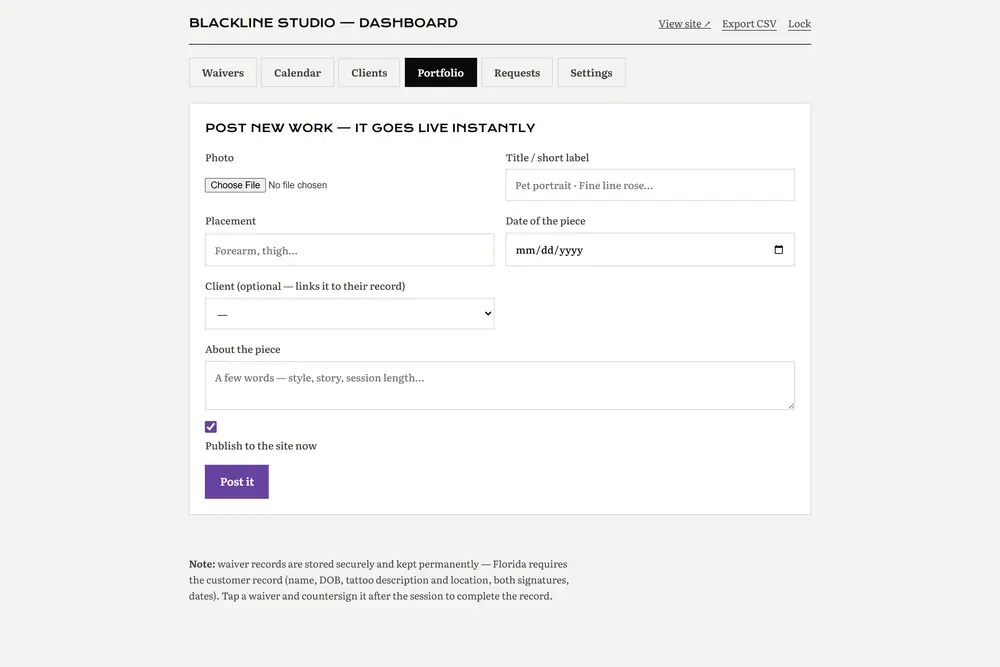
Posting work is the whole job

Pick a photo, add a title and placement, publish. Images are compressed in the browser before they're uploaded, so a full-size phone photo doesn't slow down her site for anyone.

The demo moment: post a photo, refresh the public site, it's there.

The dashboard portfolio tab, where a finished piece is posted to the public gallery.

The hard parts

Where a system like this usually goes wrong, and what we did about it.

The screen and the signature can't disagree

Every word of legal text lives in exactly one file. The form on the client's phone and the PDF they sign both read from it.

so the two physically cannot drift apart

ID photos are not public files

Proof-of-age images and scanned paperwork are stored privately and served only through an authenticated route. They are deliberately absent from the PDF and from every email.

so a leaked link can't expose a driver's licence

Deleting a legal record is meant to be hard

Records archive with one tap. Permanent deletion only exists inside the archive, behind two confirmations and a warning about Florida retention rules.

so spam is easy to clear and real records are not

The PDF reflects reality after the fact

Documents are regenerated on download rather than frozen at signing, so a copy pulled after the session shows the countersignature.

so the record is never a stale snapshot

The calendar feed is not a public URL

The subscription address carries a signed token. Without it the feed simply isn't there.

so her schedule isn't guessable

"It's live" means we checked

After deploying we fetch what the server is actually serving and compare its fingerprint against what we meant to ship, then walk the pages in a real browser.

so a cache serving last week's version gets caught by us, not by her

What Cox owned

end to end

  • Product decisions and discovery
  • Visual direction and the public site
  • The waiver flow and the dashboard
  • Data model, file storage, PDF generation
  • Email delivery and the calendar feed
  • Domains, deployment, and post-deploy verification
  • Ongoing changes as she uses it

What the client brought

hers, not ours

  • Her artwork and photography
  • The consent wording, from her own attorney
  • Business facts, hours, and pricing decisions
  • Approval on every round

We didn't write her legal text and we don't present it as ours. Our job was to make sure what she signs off on is exactly what her clients see and sign.

Proof, not metrics theatre

This system launched recently and she is still onboarding onto it. We are not going to invent a conversion lift or a percentage to put in a box. What we can offer instead is everything you can check yourself:

  • The site is live on her own domain and you can open it right now.
  • The identical platform runs at Blackline Studio on sample data — sign a waiver and watch your own record land in the dashboard.
  • The generated PDF is a real document, not an image of one. Download it from the demo.
  • Email delivery to both the studio and the client was verified end to end before handover.
  • The calendar feed has been subscribed to on a real iPhone.

No testimonial appears on this page because we haven't been given one. When she offers one, it'll go here in her words.

Technical appendix — for the developer in the room

The whole system is one Cloudflare Worker with a SQL database and an object store attached. No servers to patch, no separate hosting bill, and it runs close to the client wherever they are.

  • Cloudflare Workers
  • D1 (SQLite)
  • R2 storage
  • HTMLRewriter SSR
  • pdf-lib
  • Resend
  • HMAC sessions
  • ICS feed

The public gallery is server-rendered into the page by streaming the database rows through an HTML rewriter, so it is fast and indexable rather than a client-side fetch. Uploads are compressed on the client before they ever reach storage. Sessions are signed rather than stored, and repeated failed logins lock the address out for a while. The calendar feed is a signed URL emitting standard iCalendar with a proper timezone block, which is why Apple Calendar accepts it without complaint.

What comes next

A case study that ends at "launched" is usually hiding something. This one is a working relationship, and there is a list:

  • The site is intentionally unlisted from search until she's ready to launch publicly. That's her call, not a technical limitation.
  • Her Instagram feed will be embedded alongside the curated portfolio wall.
  • Onboarding continues — the dashboard walkthrough, the calendar subscription, publishing her first pieces herself.
  • Her Google Business listings still need consolidating so the reviews and the contact details live on the same one.

Software that stops changing is software nobody is using. We'd rather show you the list than pretend it's finished.

cox — new-project

Your business has a workflow hiding behind the website.

Forms you retype. Records in a shoebox. A thing only you know how to do. That's the part worth building. Tell us what yours is.